

Meta’s update on WhatsApp’s frequency capping was introduced to improve the user experience and reduce spam. The goal was to encourage brands to be more thoughtful and targeted in their marketing efforts, rather than overwhelming users with excessive messages.
What is Meta’s Frequency capping?
Meta recently introduced Frequency capping, which is a feature that limits the number of marketing messages a WhatsApp user can receive within a specific time frame. The aim was to improve the experience of WhatsApp users by preventing a flood of marketing messages.
The new guidelines exclude any utility templates or service conversations initiated by the end customer. The frequency cap is only on Marketing Templates sent by businesses.
Why do brands need WhatsApp Automated Retries?
Failure in sending WhatsApp marketing templates doubled since the launch of Meta’s Frequency capping. Marketing teams needed a solution to this to improve the deliverability of the WhatsApp campaign.
One of the ways to improve deliverability is to retry the campaign for up to 7 days. Meta’s per-user limit is supposed to reset every 7 days & hence 7 retries (each at 24-hour intervals) can ensure that the message gets sent to the maximum number of customers.
Retrying the message every day is a lot of manual effort and hence Interakt has brought in automated retries, wherein the message will be automatically retried the next day in case it failed due to the frequency cap error on the previous day.
(Such retries are not appropriate for highly time sensitive campaigns, such as flash sales which end in a few hours. However, most other marketing campaigns might have flexible timelines.)
Retrying the marketing campaign for 7 days can improve the campaign sent rate by 32%!
Top 2 Benefits of Automated Retries
• Higher send rate in WhatsApp Campaigns
Helps you reach more customers, thereby increasing potential revenue from the campaign.
• No Manual Error
You just need to tell us till when you would like to retry, and that’s it. The retries will happen automatically in the background.
How to set up Automated Retries for your Campaign?
1. Once you have chosen your audience, selected a template, added the next steps, and scheduled your message, you’ll get to the 6th step – Setup Retries for Failed Messages
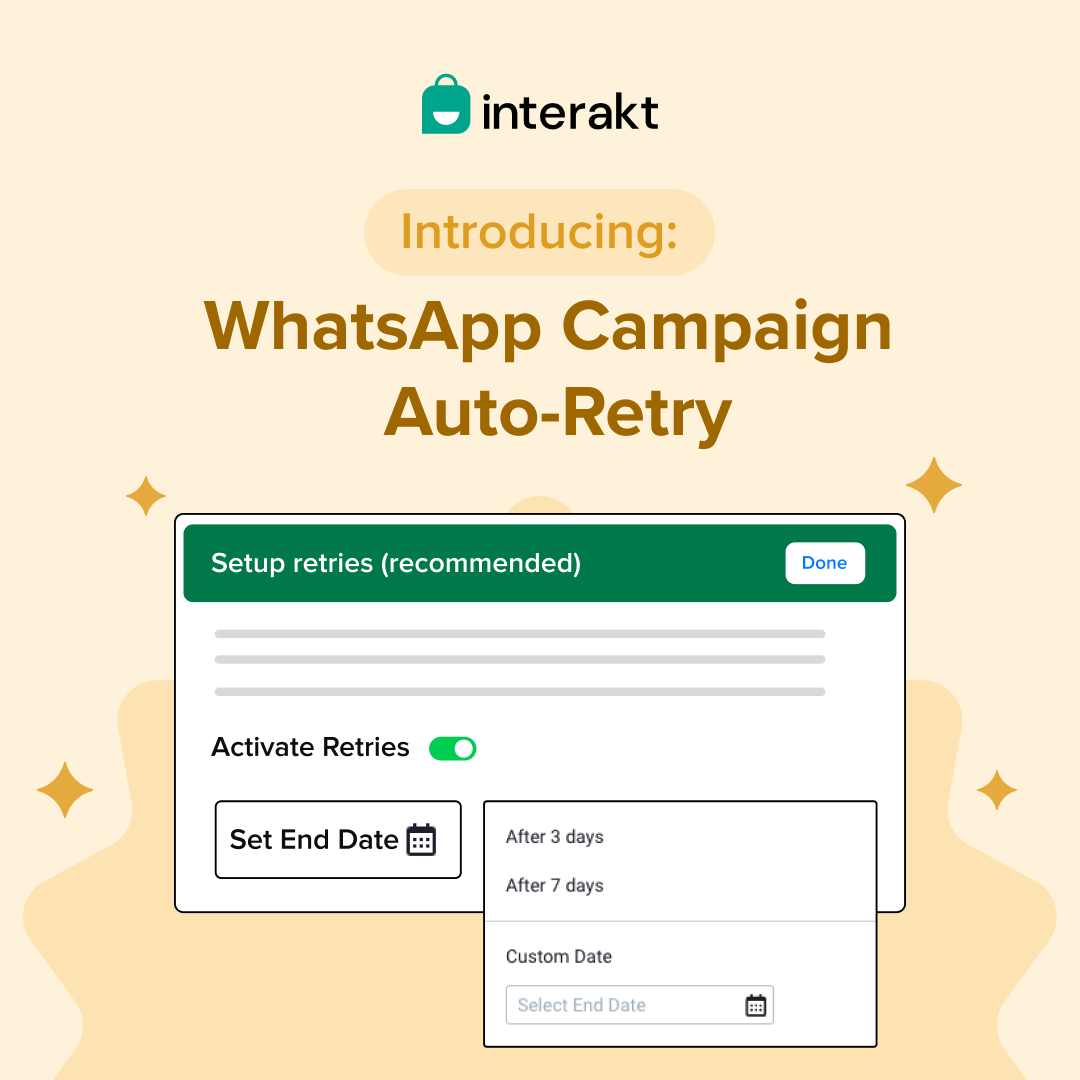
2. Just click on the toggle next to Activate Retries, and you will see the screen below. We recommend setting up the Smart Retries, instead of the 24 Hourly Retries, for 7 days to maximize the success of your campaign.
3. However, you can also select the number of retry days manually for up to 7 days only.
4. Once you have set up the retries, you can make your campaign live, and Interakt will keep re-trying messages (only those that failed due to the frequency cap) till the end date set above, after every 24 hours.
Interakt’s Smart Retries
The Smart Retries feature is an intelligent scheduling mechanism designed to maximize the delivery success of your WhatsApp marketing campaigns while respecting Meta’s platform constraints.
As you are already aware, Meta limits how many marketing messages a user can receive within a specific timeframe to prevent spam.
Therefore, if a message fails because the recipient has already reached their “cap,” the Smart Retry system doesn’t give up. It pauses and waits for a more “opportune” moment when that user’s window might have cleared.
Unlike the “24-hour retries” option (which is a rigid linear pattern), Smart Retries use a non-linear schedule. If you look at the example below:
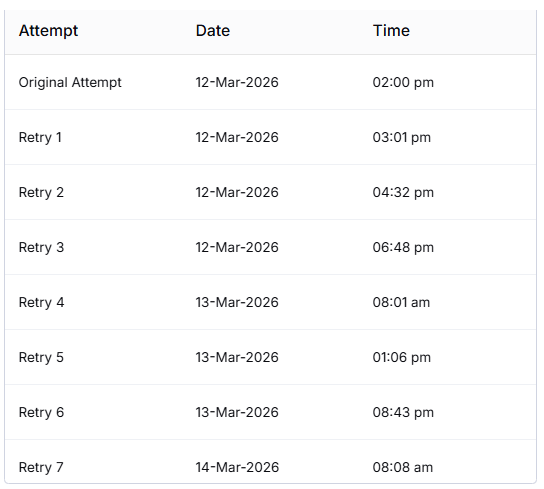
Initial Intensity: Retries 1, 2, and 3 happen rapidly on the first day (spaced roughly 1.5 to 2 hours apart). This catches users who might have just cleared a short-term cap.
Decaying Frequency: As time goes on, the gaps get wider (Retries 6 and 7 are a full day apart). This reduces “noise” and targets different times of the day to find a moment when the user is active and eligible to receive messages. And it goes on like this till the re-try window closes.

The "No-Retry" Window
This is a critical guardrail for brand reputation. For instance, you have defined a window from 10:00 PM to 08:00 AM IST. The system calculates the next “Smart” slot, but if that slot falls within this quiet period, it automatically pushes the attempt to the next available hour after 08:00 AM. This prevents your brand from “pinging” customers in the middle of the night, which could lead to blocks or reports.
Time-Bound Expiration
The system follows the End Date (set to 19/03/2026 in this example). Even if the system hasn’t finished all the retry attempts, it will stop completely once this date is reached. This ensures you aren’t sending “Limited Time Offer” messages after the offer has actually expired.
Wallet Balance Parking & Unparking Logic for Automated Retries on Interakt
Suppose a campaign is set up with 2 retries for a total campaign audience of 1000 users
1. If retry is set up for the campaign, then the full amount will be parked ie 1000 * 80 p = Rs.800 (80 p is the rate for marketing conversations in Interakt’s Advanced Plan)
Suppose, on Day 0, the campaign (with 2 retries) was sent to 900 users & failed to 100.
2. Suppose, on Day 0, the campaign (with 2 retries) was sent to 900 users & failed to 100.
At midnight of Day 0:
• Rs.800 will be unparked from your account’s wallet
• Rs. (900*80p) = Rs.720 will be deducted from the wallet.
• (800 – 720) ie Rs.80 will again be parked for future retries
• Day 1 -> The campaign was retried to 100 users; and was sent to 50 users.
At midnight of Day 1:
• Rs.80 will be unparked
• Rs.(50*80p) = Rs.40 will be deducted
• (80 – 40) ie Rs.40 will again be parked for future retries
• Day 2 -> The campaign was retried to 50 users; got sent to 25 users.
At midnight of Day 2:
• Rs.40 will be unparked
• Rs.(25*80p) = Rs.20 will be deducted.
• No more retries after this.
We hope this article helped you understand how to set up Automated Retries in Interakt Campaigns and the logic behind Wallet Balance Parking for such campaigns.